문제
유니티 에디터를 실행한 이후 처음으로 uxml 파일을 선택해서 UI Builder를 실행하면 아래 화면처럼 비율이 깨져있는 Canvas를 볼 수 있습니다.
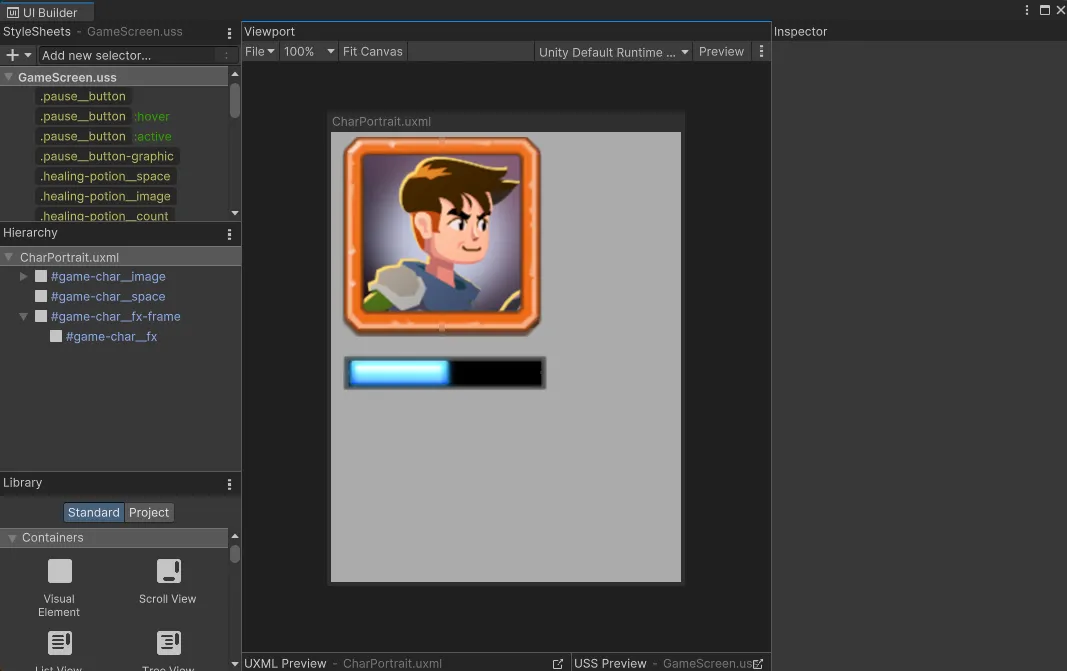
해결 방법
UI Builder → Hierarchy에서 최상위 uxml 파일을 클릭합니다.
Inspector를 확인하면 다음과 같이 Width : 350, Height : 450 이렇게 이상한 값으로 설정되어 있는 것을 확인할 수 있습니다.
해당 Size 바로 아래쪽에 위치한 토글인 Match Game View를 클릭하면 UnityEditor → GameView에서 설정한 사이즈로 적용됩니다.
만약 기본 Canvas Size를 변경하고 싶다면?
using System;
using System.Reflection;
using UnityEditor;
using UnityEngine;

#if UNITY_EDITOR

internal class PatchUIBuilderSize
{
    const int UIBUILDER_CANVAS_WIDTH = 1920;
    const int UIBUILDER_CANVAS_HEIGHT = 1080;

    [InitializeOnLoadMethod]
    private static void SetUIBuilderConstants()
    {
        var t = Type.GetType("Unity.UI.Builder.BuilderConstants, UnityEditor.UIBuilderModule");
        if (t == null)
        {
            Debug.LogWarning("Couldn't patch UI Builder default size. BuilderConstants type not found.");
            return;
        }

        FieldInfo initialWidth = t.GetField("CanvasInitialWidth", BindingFlags.Static | BindingFlags.Public);
        if (initialWidth == null)
        {
            Debug.LogWarning("Couldn't patch UI Builder default size. CanvasInitialWidth field not found.");
            return;
        }

        FieldInfo initialHeight = t.GetField("CanvasInitialHeight", BindingFlags.Static | BindingFlags.Public);
        if (initialHeight == null)
        {
            Debug.LogWarning("Couldn't patch UI Builder default size. CanvasInitialHeight field not found.");
            return;
        }

        initialWidth.SetValue(t, UIBUILDER_CANVAS_WIDTH);
        initialHeight.SetValue(t, UIBUILDER_CANVAS_HEIGHT);
        Debug.Log("(PatchUIBuilderSize) Patched UI Builder to set initial dimensions to 1920 * 1080");
    }
}

#endif해당 스크립트를 사용하면 에디터를 실행할 때 설정한 사이즈 ( 1920, 1080 )로 자동 적용 됩니다.
*uxml 에서 루트 Visual Element가 있어야 작동합니다.
출처
https://discussions.unity.com/t/default-canvas-size/932687/4